In this detailed review, we will provide an in-depth analysis of SentryPC, a powerful remote PC monitoring software. With the increasing need for effective monitoring solutions, SentryPC aims to provide businesses and individuals with a robust tool to track computer activities and enhance productivity.
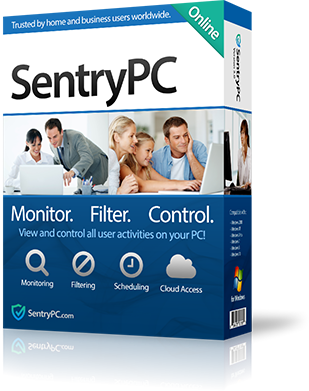
Throughout this review, we will explore the features, benefits, pricing, customer reviews, common issues, and more, to help you make an informed decision about using SentryPC.
Overview of SentryPC
SentryPC is a leading computer monitoring software designed for businesses, parents, and individuals who want to monitor and control computer activities.
It offers a range of features that enable users to track website visits, application usage, keystrokes, and more. Whether you're a concerned parent or a business owner looking to enhance productivity and security, SentryPC provides the tools to monitor and manage computer usage effectively.
SentryPC supports all your devices
SentryPC is a versatile remote PC monitoring software that caters to all your devices. Whether you're using Windows or Mac operating systems, Smartphones, and iPhones, SentryPC ensures seamless compatibility and functionality across various devices.
From desktop computers to laptops and even mobile devices, you can monitor and manage activities from a centralized dashboard, providing you with comprehensive control and insights. With SentryPC, you can keep track of employee productivity, protect your children from online threats, and maintain a secure computing environment across all your devices.
Features and Benefits of SentryPC
SentryPC offers a wide array of features that cater to the needs of different users. Some of the key features include:
Activity Monitoring: SentryPC records and logs all computer activities, including website visits, applications used, keystrokes, and more. This comprehensive monitoring allows users to gain insights into how computers are being utilized.
Real-time Screenshots: With SentryPC, you can capture screenshots of the monitored computer's screen at regular intervals. This feature provides visual evidence of activities and helps identify any misuse or unauthorized access.
Application Blocking: SentryPC enables users to block specific applications or restrict access to certain programs. This feature is particularly useful for businesses that want to prevent time wastage on non-work-related applications.
Website Filtering and Blocking: Users can set up website filters and block access to inappropriate or distracting websites. This feature is essential for parents who want to ensure a safe online environment for their children or businesses that need to enforce internet usage policies.
Keystroke Logging: SentryPC logs all keystrokes made on the monitored computer, allowing users to review typed messages, emails, and passwords. This feature can be valuable for detecting potential security breaches or monitoring employee communication.
SentryPC vs. ActivTrak: Choosing the Right Monitoring Solution
When considering remote PC monitoring software, it's essential to compare different options. Two popular choices in the market are SentryPC and ActivTrak. Let's compare their key features to help you make an informed decision:
Activity Monitoring: Both SentryPC and ActivTrak offer comprehensive activity monitoring, but SentryPC provides more advanced features such as real-time screenshots and keystroke logging.
Application Blocking: Both software solutions allow users to block applications, but SentryPC offers more flexibility in terms of customization and granular control.
Website Filtering and Blocking: SentryPC and ActivTrak provide website filtering and blocking features, but SentryPC offers more extensive website categorization and customization options.
Ease of Use: SentryPC is known for its user-friendly interface and intuitive controls, making it easy for both beginners and advanced users to navigate and utilize the software effectively.
Comparison of Key Features
Here is a detailed comparison of the key features offered by SentryPC and ActivTrak:
Features | SentryPC | ActivTrak |
Activity Monitoring | ✔️ Advanced monitoring with detailed logs and real-time screenshots | ✔️ Comprehensive activity tracking |
Application Blocking | ✔️ Flexible application blocking and restrictions | ✔️ Application blocking capabilities |
Website Filtering | ✔️ Extensive website filtering options and customization | ✔️ Website filtering and blocking |
Keystroke Logging | ✔️ Logs all keystrokes for monitoring communication | ❌ Keystroke logging is not available |
User-Friendly Interface | ✔️ Intuitive and easy-to-use interface | ✔️ User-friendly interface |
Pricing and Plans

SentryPC offers several pricing plans to accommodate different needs and budgets. The plans include Basic, Business, and Enterprise, with varying features and support options. It's important to assess your requirements and select the plan that best aligns with your monitoring needs.
Customer Reviews and Testimonials
SentryPC has garnered positive feedback from its users. Many customers appreciate the software's ease of use, powerful monitoring capabilities, and reliable customer support. Here are a few testimonials from satisfied users:
"SentryPC has been a game-changer for our business. It allows us to monitor employee activities effectively and boost productivity. Highly recommended!" - John D., CEO of XYZ Company.
"As a parent, I wanted to ensure my child's safety online. SentryPC provided the perfect solution with its comprehensive monitoring features. It gives me peace of mind knowing I can protect my child from harmful content." - Sarah M., Parent.
Common Issues and Troubleshooting
While SentryPC is a robust monitoring solution, some users may encounter common issues. Here are a few common problems and their troubleshooting steps:
Installation Errors: If you face difficulties during the installation process, make sure to follow the provided instructions carefully and ensure your system meets the software's requirements.
False Positives: Occasionally, SentryPC may flag legitimate activities as suspicious. To address this, review the settings and customize the monitoring parameters to reduce false positives.
Compatibility Issues: SentryPC is compatible with Windows and Mac operating systems, but ensure you have the latest updates and meet the system requirements for optimal performance.
How to Know if SentryPC is Enabled
To determine if SentryPC is enabled on a computer, follow these steps:
Look for the SentryPC icon in the system tray or taskbar. If it's present, the software is active.
Check the installed programs list in the control panel or settings. If SentryPC is listed, it indicates that the software is enabled.
Monitor any activity logs or reports generated by SentryPC to confirm its functionality.

Remote PC Monitoring Software
Remote PC monitoring software, such as SentryPC, allows users to monitor computer activities from a remote location. It provides a convenient solution for businesses with remote teams or parents who want to ensure their child's online safety.
Computer Monitoring Software
Computer monitoring software, like SentryPC, helps track and manage computer usage. It provides insights into application usage, internet activity, and overall productivity, making it a valuable tool for businesses and individuals.
Computer Monitoring Systems
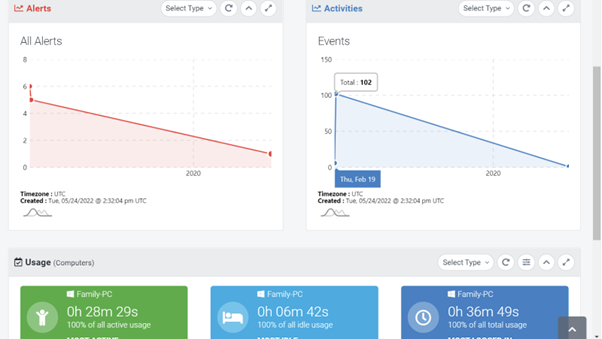
Computer monitoring systems, such as SentryPC, offer a comprehensive approach to tracking and managing computer activities. These systems provide features like activity logging, application blocking, and website filtering, allowing users to maintain a secure and productive computing environment.
Conclusion
In conclusion, SentryPC is a powerful remote PC monitoring software that offers comprehensive monitoring and control features for businesses and individuals. With its user-friendly interface, advanced activity tracking, application blocking, website filtering, and keystroke logging capabilities, SentryPC provides a robust solution for enhancing productivity, improving security, and ensuring a safe computing environment.
By implementing SentryPC, businesses can effectively monitor employee activities, prevent time wastage on non-work-related tasks, and protect sensitive data. Parents can use SentryPC to safeguard their children from inappropriate content and online dangers. The software's positive customer reviews and testimonials attest to its reliability and effectiveness.
With its range of pricing plans and customizable features, SentryPC caters to various needs and budgets. Whether you're a small business owner, a concerned parent, or an individual looking to monitor your own computer usage, SentryPC offers the tools and flexibility to meet your requirements.
FAQs (Frequently Asked Questions)
Q1. Can I monitor multiple computers with SentryPC?
A1. Yes, SentryPC allows you to monitor multiple computers simultaneously. You can manage and track activities across multiple devices from a centralized dashboard.
Q2. Does SentryPC work on both Windows and Mac computers?
A2. Yes, SentryPC is compatible with both Windows and Mac operating systems, ensuring broad accessibility for users.
Q3. Can I customize the website filters in SentryPC?
A3. Absolutely! SentryPC provides extensive website filtering options, allowing you to customize the filters based on your specific requirements.
Q4. Does SentryPC record every keystroke made on the monitored computer?
A4. Yes, SentryPC offers keystroke logging, which records all keystrokes made on the computer. This feature provides valuable insights into typed messages, emails, and passwords.
Q5. Is there a free trial available for SentryPC?
A5. Yes, SentryPC offers a free trial period, allowing users to test the software's features and functionalities before making a purchase.
In summary, SentryPC is a comprehensive remote PC monitoring software that empowers businesses and individuals to effectively monitor and manage computer activities.
With its advanced features, user-friendly interface, and positive customer reviews, SentryPC stands as a reliable choice for enhancing productivity and ensuring a secure computing environment.
Remember to make an informed decision based on your specific needs and take advantage of the free trial offered by SentryPC. Get started today and experience the benefits of remote PC monitoring software in optimizing your computer usage and security.
Comments
Post a Comment